Why SendGrail is Different From All Other SMTP Plugins?

A long list exists when choosing an SMTP plugin to ensure your email deliverability in WordPress. From the most popular WP Mail SMTP to the hugely trusted FluentSMTP, there are powerful options both in the free and premium categories.
But how can SendGrail, a relatively new SMTP plugin, catch my attention?
Well, this post is all about that.
As a plugin reviewer and a WordPress enthusiast, I always try to find solutions that help businesses.
Often, I see new plugins being released in the same niche. But only a few can show potential. And SendGrail is one of them.
Why do we need an SMTP plugin?
I will talk about this briefly since this post is not about SMTP 101.
When we send a mail from our WordPress website, we want to ensure that the email is sent to the recipient’s inbox instead of landing in the spam folder.
WordPress uses a function known as PHP mail() to send automated emails. These may include various types of emails for form submissions, password reset links, eCommerce order receipts, etc.
When major email providers like Gmail, Outlook, or Yahoo receive an email, they look for proper email authentication records (like SPF, DKIM, and DMARC).
If you use the default method, it means you’re leveraging the default web hosting server that lacks the authentication records. Eventually, your emails fall under suspicion by the email providers.
What happens when you use an SMTP plugin?
When you get started with an SMTP plugin, the first thing you do is connect your selected providers with proper authentication.
Now, instead of your web server directly sending the email, the SMTP plugin securely logs into your dedicated email provider, and the email provider sends the email on your website’s behalf.
Why I think SendGrail tops all other existing solutions
Here’s the interesting part. Out of dozens of well-known SMTP plugins, why I think SendGrail is going to change the email sending scenario. Why SendGrail will be considered as the most reliable solution in the near future.
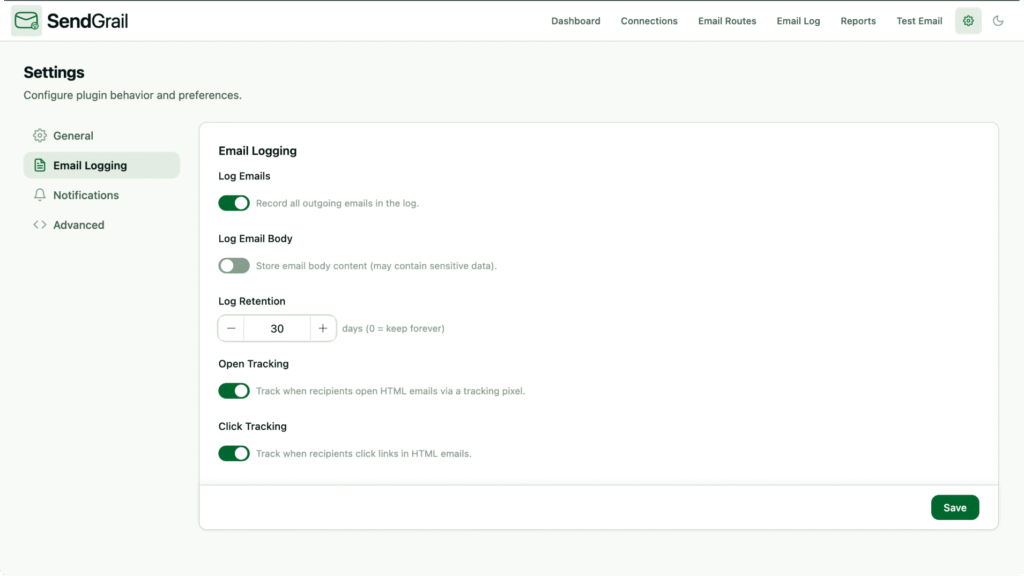
Because it comes with a fresh UI
Old UI, cluttered environment, bad UX – these are common to almost all other SMTP plugins that exist in the market.
You’ll get confused about where to start or how to proceed.
SendGrail stands out with a bold strike regarding the modern, clean interface. It’s refreshing, it’s uncluttered.
For beginners or pros, everybody will feel fantastic with the thoughtful design of the plugin.
Not to mention that it has a dark and light mode that I don’t see in any other plugin of this niche.
Because it has all the superpowers that no one provides
By saying “no one provides,” I mean you’ll get all the amazing features of SendGrail in different plugins, but not all features in one plugin.

SendGrail comes with detailed email logging that allows you to see tiny details (like status, open, and clicks) attached to your email sending.
Another amazing feature is fallback routing. When your primary email provider fails to send a mail, SendGrail will try to resend it with a backup mail provider.

Likewise, their reporting is as awesome as all other powerful features. Let’s talk about the dashboard first. You’ll see that whenever you enter the plugin.
Here you’ll get a sneak peek of your entire email delivery that includes total emails, emails sent, emails failed, success rate, and more.
Moving on to the main reporting, you’ll find more granular details on your email sending that include delivery rate, open rate, click rate, and bounce rate.
What I like most is the activity heatmap, which is visually appealing, and you’ll get a quick overview of the overall activity.
Conditional routing is another notable feature that allows you to set conditions according to your needs. Which simply means you can send different types of emails via multiple email providers using conditional logic.
SendGrail also shows you open and click-through rates, which will help you to understand how your emails are working.
You can learn more from the SendGrail website.
Because it has all the essential connections and more
When I’m writing this section, I’m overly thrilled. You’ll know why.
WP Mail has around 18 integrations, and some of them are paid.
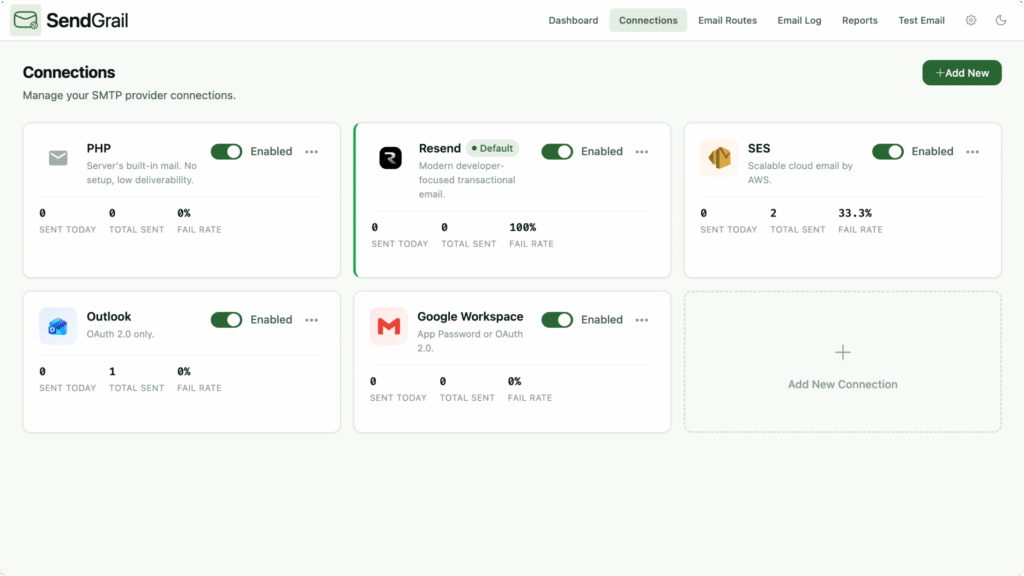
FluentSMTP is a completely free product, but it has around 12 integrations.
Guess how many connections SendGrail provides. Yes, it’s a whopping 18 (including default PHP and custom), and it charges zero dollars for that.
The number of integrations they’re giving in the free versions, many premium plugins can’t do that.
Because it helps with clear documentation

I don’t know about the other support channels, but it has detailed documentation. From plugin setup to advanced configuration, it has everything there.
Especially, every email provider has their own way of the connection process. But SendGrail covers it so clearly that anyone can configure their favorite email provider.

For any tech product, I usually check how clearly they designed the documentation. It’s the right place for people to look for solutions when they’re stuck.
And, SendGrail wins there without any doubt.
Because it doesn’t restrict powerful features behind a paywall
Let me be clear on this: I’m not criticizing the paid models. People make solutions to help others, and it can’t be free because of the operational costs. Besides that, without proper earnings, a company can’t thrive.
Here I’m advocating SendGrail because this plugin is totally free. And it’s not alone in this category.
There are other SMTP plugins that are completely free. So the comparison is not merely against other pro plugins, but it’s against free plugins also.
Final comment
Although I bet on this plugin, I should also talk about my doubt. Though everything’s promising with this plugin, only one place remains where I can’t rely fully. It’s a new plugin, so we don’t know where it will be headed in the next few years. They just started with a big shot, and I hope they’ll be continuing with their surprises. A regular update cycle is enough, given their mesmerizing start. To support the plugin, download SendGrail from wp.org.