Manage, Cloak, Monitor: Why Link Manager Pro Is a Game-Changer for WordPress Users
Link management is a tiring job. And without managing links properly, you’ll lose potential revenue. To resolve this and gain more benefits, a powerful WordPress link management solution is needed.
Usually, content-heavy websites need link manager plugins. The more links your site has, the messier it becomes.
In today’s post, I’m going to talk about the perfect solution that you have been waiting for a long.
Yes, there are a dozen WordPress plugins for link management. But you know what? None of them is an allrounder.
While one tool is good for some problems, others are great for something else. In the end, you’ll think about how I can make it more optimal.
With the solution I’m talking about, affiliate marketers, bloggers, SEO professionals, and site owners who struggle with tons of links can now smoothly handle all links inside their WordPress dashboard.
Link Manager Pro combines link cloaking and shortening, performance analytics, broken link monitoring, and keyword auto-linking in a single dashboard — aiming to replace multiple plugins with one comprehensive tool.
What is Link Manager Pro?
Link Manager Pro is an all-in-one WordPress plugin designed to simplify how you handle outbound and affiliate links on your site.
Rather than using separate tools for cloaking, tracking, and broken link monitoring, it brings all of these under one roof.
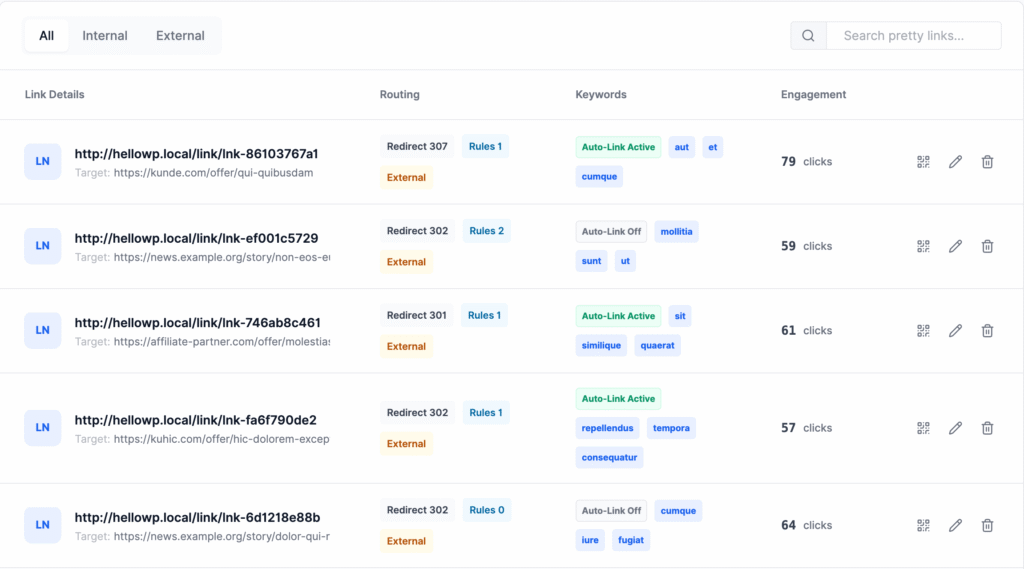
The plugin positions itself as a centralized hub you can use to prettify links, protect SEO, and gain insights into link performance without jumping between panels or multiple extensions.
It’s aimed at:
- Affiliate marketers — for managing campaigns and maximizing clicks
- Content publishers — for fixing broken links that harm user experience and SEO
- Agencies — who need client reporting and scalable tools
- Bloggers and businesses — for professional linking and analytics
Deep dive into features
Let’s go in detail about all the highlighted features this awesome tool brings on the table.
Affiliate Link Cloaking & Shortening
First thing first. Affiliate marketers like me deal with tons of links, and not to mention those affiliate links have some weirdest structures. Since you have no control over the link generation, all you have to do is accept how they appear.
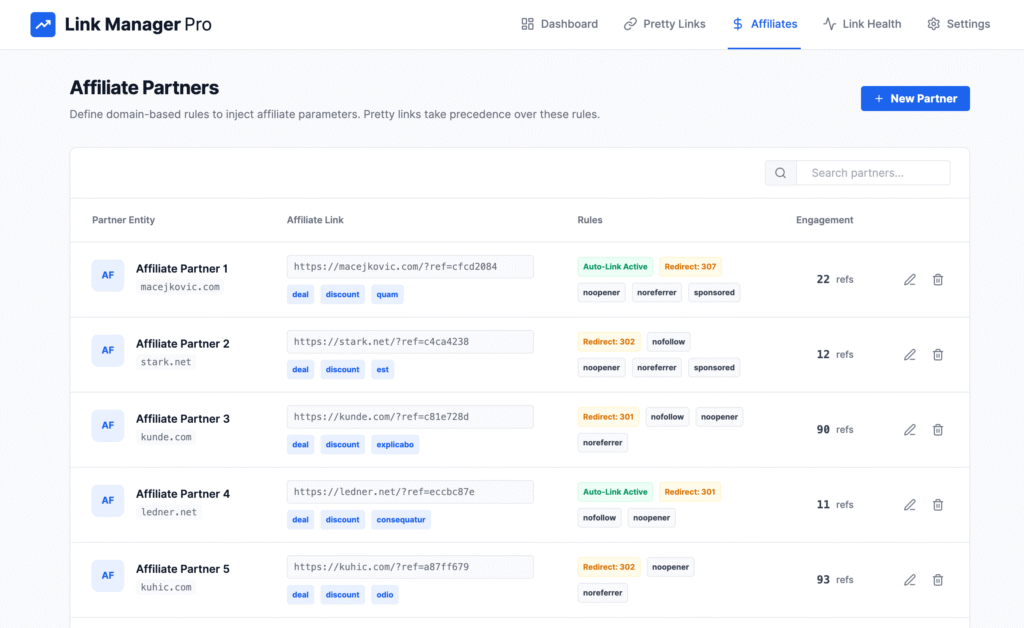
When you think about making those links beautiful and matching with brands, you need dedicated WordPress plugins that do this job perfectly.
Link Manager Pro prettifies ugly affiliate links and shortens them. As a result, you’ll get some neat and branded links. The best part? Those links are truncated automatically.
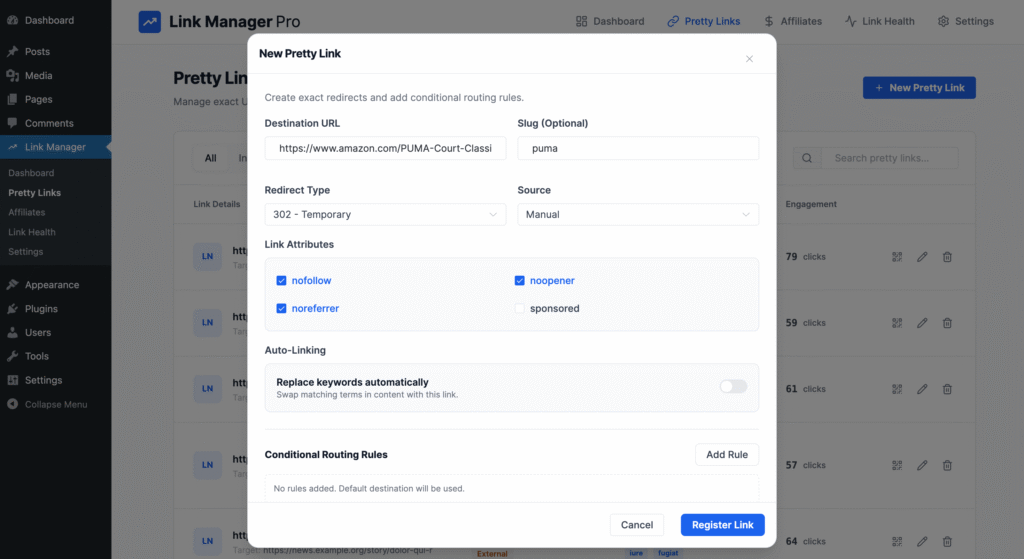
This not only improves trust with visitors but also helps safeguard your affiliate commissions by hiding referral IDs from casual tampering. Cloaked links also appear more professional and memorable — a big plus for social sharing and branding.
- Custom link slugs of your choice
- Branded domain support
- ‘nofollow’, ‘sponsored’ and other link attributes for SEO compliance
Dashboard & Analytics
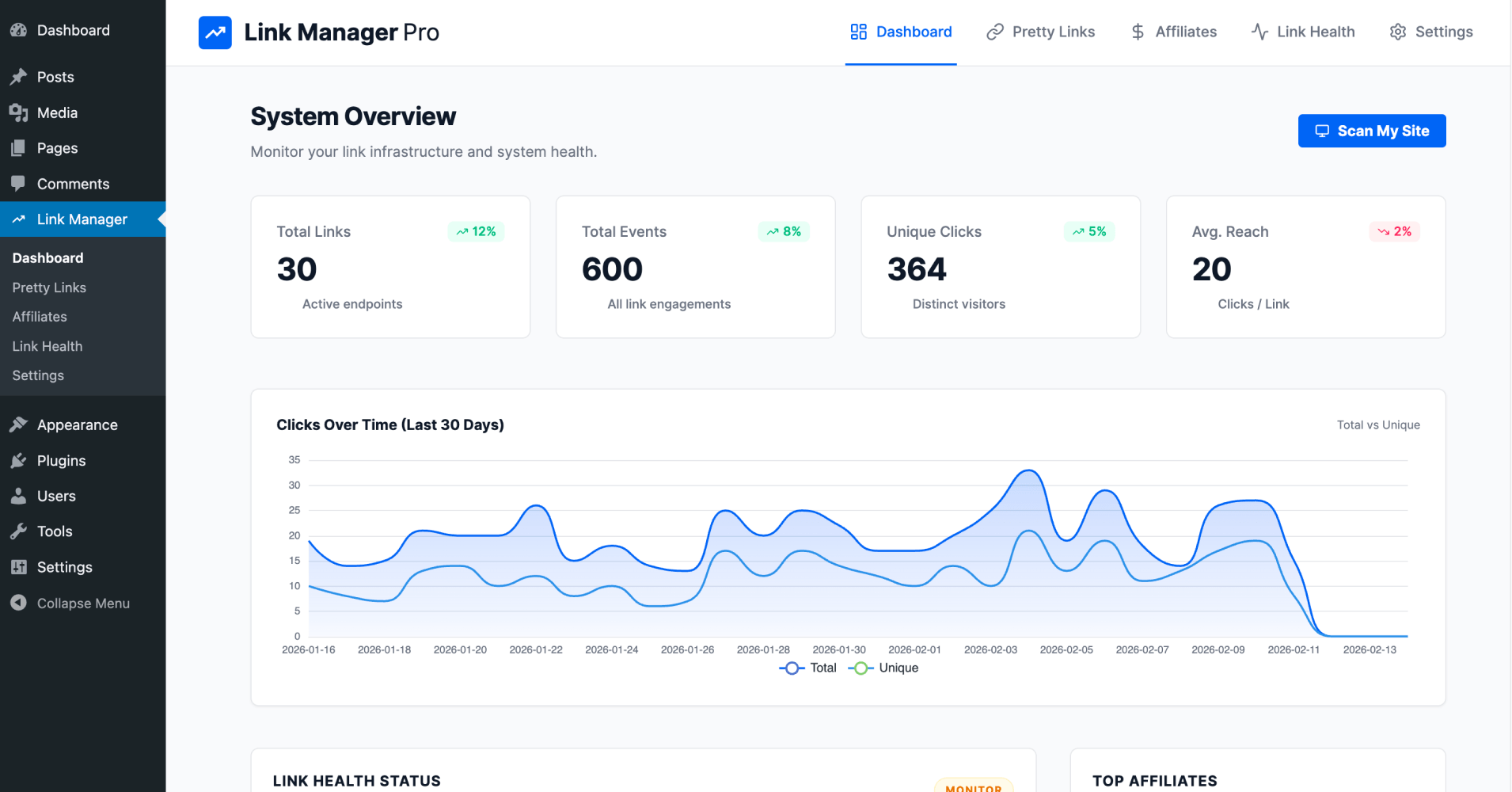
Right after invoking scan, you’ll meet the most optimized, real-time dashboard that displays everything’s going with your website links.
Within minutes of setup, you can begin tracking performance metrics such as total clicks, unique clicks, top-performing links, and device or geography breakdowns. This makes it easier to evaluate which offers and content resonate most with your audience.
- Total links and engagement
- Unique clicks based on individual visits
- Click trends based on a certain period
- Link health status for broken links and 404 errors
- Top performing posts
- Top affiliates and pretty links
Link Health & Broken Link Monitoring
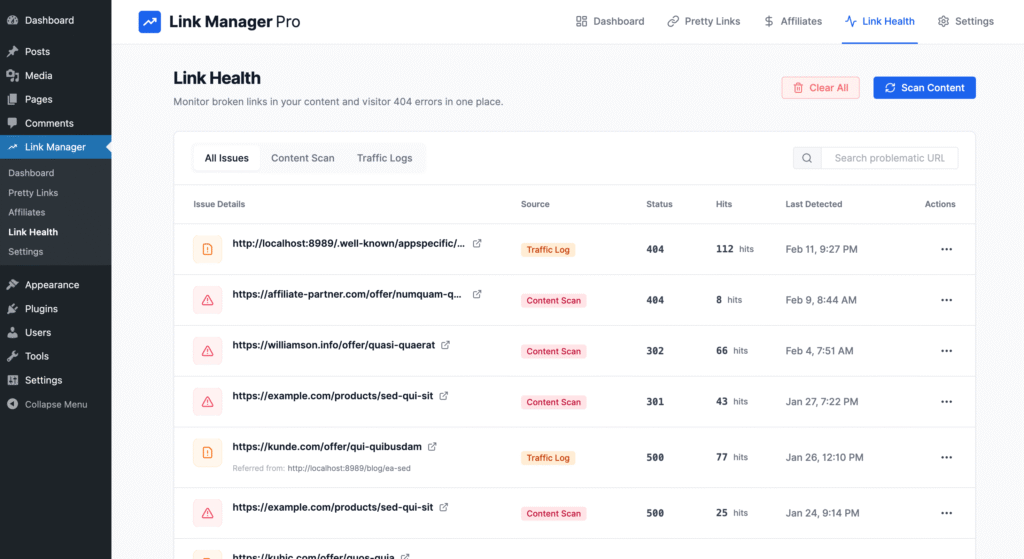
Broken links are notorious for killing SEO rankings and frustrating visitors.
It’s a hard job to find all broken links manually. You don’t know how your ranks are falling behind your back.
Link Manager Pro includes automatic scanning of all tracked links on your site and reports broken or unhealthy links so you can fix them before they damage user experience or search visibility.
You can see all issues under one dashboard with detailed intel like particular links, status, number of hits, and last detection time.
What’s more amazing is you can take immediate action to fix the errors. You can create redirection instantly to save your site from further damage. Also you can ignore or delete the issue if you think it’s unnecessary.
- Site-wide broken link scan
- 404 error detection
- Instant fix with redirection
- Status reporting in one dashboard
- Separate tabs for content scan and traffic logs
Auto-Link Keywords
Affiliate marketers will thank me when they see this very feature. It will definitely save you hours of manually inserting affiliate links. Define a list of keywords once and the plugin automatically tags or links these throughout your content.
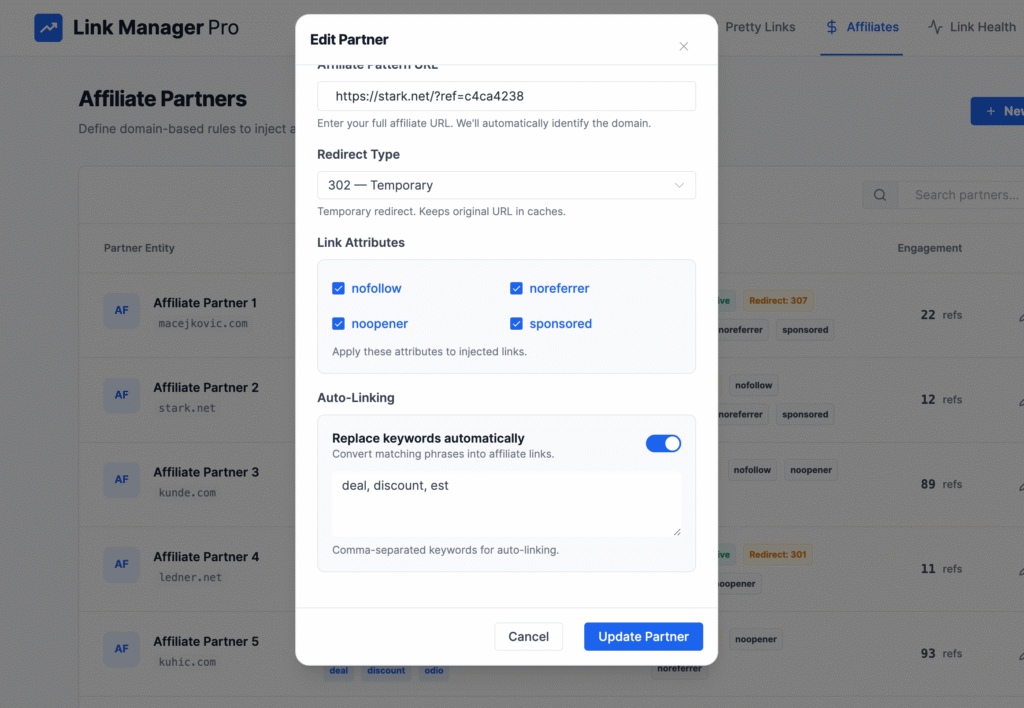
Whether you’re promoting products, services, or internal pages, this helps ensure consistency without repetitive edits. When you use one of your pre-defined terms, it will automatically turn into a link.
- Unlimited keyword rules
- Works across posts and pages
- Helps improve affiliate monetization passively
- Use multiple, meaningful keywords for one link
Pricing
At this point, I’d like to talk about the pricing of Link Manager Pro so that you can make the right decision while considering other factors. I’ll discuss the competitive analysis in a moment.
How it stands against its competitors
Let’s see how Link Manager Pro stacks up against some well-known alternatives in the WordPress ecosystem.
Broken Link Checker
Unlike Link Manager Pro, Broken Link Checker focuses only on spotting broken links and missing images across your site. While excellent for link health, it doesn’t provide cloaking, affiliate tracking, or keyword auto-linking.
Best for: Sites needing a dedicated broken link monitor
Not ideal for: Affiliate marketing and link branding
PrettyLinks
PrettyLinks is one of the most popular link management plugins, offering powerful cloaking, redirection types, and automated health checks in its Pro plans. It also supports auto-linking keywords in Pro tiers. However, PrettyLinks can require multiple add-ons to do everything Link Manager Pro includes by default.
Pros: Robust ecosystem, mature product
Cons: More expensive at scale; fragmented features set. A lot of unnecessary integrations made the plugin heavier.
BetterLinks
BetterLinks delivers a similar feature set — link shortening, tracking, auto keyword linking, and even broken link checking — often with a drag-and-drop UI. BetterLinks is strong for visual management and campaign tracking. It’s widely praised for UI/UX and Google Analytics integration, though some advanced features are Pro-only.
Pros: Good analytics and UI, role management, easy import option
Cons: QR codes, bot filtering, geo tracking and many other essential features are not available
ThirstyAffiliates
ThirstyAffiliates is a veteran in this niche with cloaking, 404 checking, and automation features. Its Automatic 404 Checker works well, but its auto scanning and reporting aren’t as centralized as Link Manager Pro’s dashboard.
Pros: Well-known, reliable affiliate features
Cons: Interface dated relative to newer plugins
Affiliate Links
A free plugin that handles cloaking, redirect types, and basic tracking. It’s a solid entry-level tool but doesn’t include the advanced analytics or site-wide broken link monitoring that Link Manager Pro offers.
Pros: Free and simple
Cons: Lacks premium dashboard insights
Pros and Cons
Although Link Manager Pro is an amazing plugin I truly vouch for it, I think I should discuss all the good and bad to show you the real picture.
Pros
✅ The best in class UI – Among all the available solutions in the market, Link Manager Pro has most versatile and cleanest UI.
✅ All-in-one solution – Combines multiple link marketing tasks in a single interface.
✅ Improved SEO and user experience – Cloaked links appear more trustworthy and broken link monitoring protects search visibility.
✅ Replaces multiple plugins – While you need separate plugins for various tasks related to link management offers a combined solution.
✅ Automated workflow – Keyword auto-linking and health scans save manual effort.
✅ Real-time analytics – Data-driven insights help optimize campaigns without external tools.
✅ Self-hosted – All data stays within your WordPress install; no 3rd-party dependency.
✅ The roadmap for long run – While the plugin is a fresh introduction in the market
Cons
❌ Newer relative to legacy tools – Lacks the massive install base and community guides that established plugins benefit from.
❌ Pricing transparency is less prominent compared to competitors (requires visiting the site for details).
❌ Commission tracking integration requires API hookups with affiliate networks (not auto tracked in all cases).
Conclusion
Link Manager Pro is a compelling all-in-one solution for content-heavy websites. You’ll thank me later.
This plugin is launching a limited lifetime deal, I’m sure you’re not gonna miss this opportunity.
If you want to have cloaking, analytics, link health monitoring, and automation into one coherent dashboard, grab the LTD now.
For affiliate marketers and high-traffic sites that rely on consistent tracking and SEO, it’s especially valuable — saving time and reducing dependency on multiple plugins.
While established competitors like PrettyLinks and BetterLinks remain strong options with mature ecosystems, Link Manager Pro’s centralization and workflow automation make it particularly attractive for users who prefer simplicity without sacrificing power.